













Telegram is now a powerful and popular platform for sharing all kinds of content, from educational materials, fun videos, and crypto signals, to original music and codes. But with its flexibility also comes a big challenge: people copy or forward the content to use it for free or (even worse) make money from it. If you’re a content creator, business owner, crypto analyst, or freelancer, it’s important to know how and why to restrict content on Telegram.
In this article by SmartBotsLand, we have explained why you should lock or restrict content, which types of content deserve protection, and how to prevent users from saving, forwarding, or copying your materials.
How to Restrict Content on Telegram
Before, people had to use bots to stop users from forwarding or copying content. However, Telegram now has a special setting to help you restrict content on Telegram channels and groups, even the public ones. Just follow these steps:
For Channels
- Click on the channel name and choose “Channel Settings.”
- Choose “Channel Type”.
- Scroll down and turn on the option “Restrict Saving Content.” This prevents members from forwarding messages, taking screenshots, or saving media.
Note: If you click on the “Manage Invite Links”, you can see a unique link which is only for your PRIVATE channel. This link cannot be edited. If you can edit it, it means your channel is public.
For Groups
- Tap the group name, then choose “Group Setting”.
- In the opened window, click “Group Type”.
- Click the “Restrict Saving Content” to enable it.
- Enable the button next to it to prevent members from forwarding messages, taking screenshots, or saving media.
Note: Don’t forget to “Save” the changes (both channels and groups)
Why You Should Restrict Content on Telegram
If you decide to restrict or lock your content on Telegram, it doesn’t mean you are secretive or stingy. It only means you want to protect your idea, knowledge, and art from modern thieves. Here are 5 reasons why people restrict content on Telegram channels and groups:
1) Prevent Content Theft
Many creators share exclusive videos, PDFs, or premium tutorials in Telegram channels or groups. Without restrictions, anyone can forward or download your material and share it publicly. If you’re a content creator who publishes online/offline courses, eBooks, or premium videos, this can hurt your reputation and lower your income.
2) Protect Paid Subscriptions
If you have a paid Telegram channel or a subscription business, restricting content is even more important. If you allow the users to forward and download your content freely, you will lose subscribers and income in a very short time. When you lock the content, only active subscribers who’ve paid for access can view it.
3) Build Trust and Credibility
In private or VIP groups, if the information or internal conversations leak, the users will be confused and lose their trust. When you restrict content on Telegram groups, you create a safe place where members feel comfortable sharing ideas and feedback. They know that their messages and files won’t be in anyone else’s hands.
4) Comply with Legal or Licensing Agreements
Sometimes, protecting content isn’t just “an option”, it’s a “legal requirement”. If you share licensed media, client data, or copyrighted material, you might be legally obligated to prevent forwarding and copying. This is especially important for agencies and digital marketing companies.
5) Improve Brand Image
Businesses and influencers that protect their content and information show that they value privacy. Customers and followers notice these details and will probably subscribe and pay for that channel. Plus, many people believe that nothing valuable is free. So, when you restrict content on Telegram and charge people for it, they will see it as an unattainable treasure chest, if you get what I mean.
Tip: For pictures, videos, and files, you can add a watermark to prevent clients from using your work. However, unfortunately, there are some AIs that remove the watermark without lowering the quality of the artwork. That’s why watermark is no longer the best option for protecting digital assets.
What Type of Content Should Be Locked
Not all content on Telegram needs to be locked. Some channels share royalty-free music, public files, or poems from decades ago; so, they don’t need to bother themselves with restricting content (although it takes only 5 minutes of their time).
However, the following types of materials are typically worth protecting:
- Exclusive or Paid Content: Premium videos, eBooks, or courses available only to subscribers.
- Business Documents: Internal company data, project files, reports, or contracts.
- Media Files: Photos, music, or video clips that you don’t want to be downloaded or shared.
- Community Resources: Guides, internal rules, and confidential discussions inside private groups.
- Brand Assets: Logos, templates, or marketing materials not meant for public use.
.
Use Telegram Bots for More Restrictions
Some Telegram bots allow you to restrict the content even more. For example, the SmartBotsLand bots have a setting that prevents users from downloading, copying, and forwarding content. These bots are mainly used to protect crypto signals and educational materials.
Of course, the pre-made bots by SmarBotsLand also do the following:
- Restrict access to premium channels automatically.
- Manage user subscriptions and renewals.
- Lock content after expiration.
- Managing transactions.
- Supporting different payment gateways, both fiat and crypto.
The Last Words
Learning how to restrict content on Telegram is important for content creators, brands, musicians, analysts, and businesses who want to protect their digital assets (yes, you heard it right ! it’s an asset) from plagiarists. Whether you run a private coaching group, sell premium videos, or manage a crypto channel, Telegram’s restriction tools help you protect your hard work from unauthorized sharing.
If you are too sensitive about your data, we suggest using bots to protect it. Bots are like a police force working around the clock, and only allow the premium users to use the content you create. If you need a reliable bot that manages your channel and transactions, the SmartBotsLand Subscription Bot is a good choice for you.
FAQs
- Can users still take screenshots after I restrict saving content?
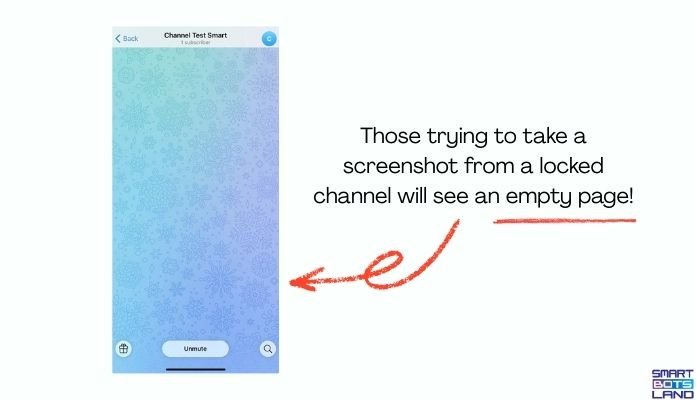
No. On mobile devices, Telegram blocks screenshots in channels or groups where “restrict saving content” is on. The one who took a screenshot will see a blank page (Look at the pic below). But this feature doesn’t work on Telegram Desktop. We are sure that the TG team is working on it.
- If I restrict content, will it affect the admin rights too?
Yes. Although admins have full access and can manage all posts and media, they cannot take a screenshot, copy, or forward the text. - Can I restrict only certain messages, not the whole channel?
Unfortunately no. Until today (Dec 2025), Telegram applies content restrictions at the channel or group level, not per message. It means that you cannot lock only one message. - Can bots copy my work on Telegram after I enable Restrict Saving Content?
No. Bots from reliable sources are not authorized to do so. Harmful bots, on the other hand, might be able to copy the content without the owner’s permission. That’s why we recommend not adding unknown bots to your channel or buying fake Telegram users (they are either harmful bots or deleted accounts). - What happens if I turn off “Restrict Saving Content”?
As soon as you turn off, users can again forward, save, and copy your content. - Who can enable Restrict Saving Content?
The owner of the channel or group, as well as the admins with full permissions.