













I think everybody agrees that Telegram’s business model is super. Its marketing and business team is genius because they create a new model every now and then and make tons of money. For example, they first offered a freemium model, where people can use lots of features for free, but they can also have exciting features (like cool stickers and Telegram Story) if they purchase the Premium version. Then, they enabled the advertisement option for businesses. Telegram shows minimalist, non-intrusive ads in large public channels and makes money through them. But their last (and best) innovation is Telegram Stars.
In this article by SmartBotsLand, we explain what these shiny stars are, how to buy and use them, and how to change them into real money ($, €, £, and ¥).
What Are Telegram Stars?
Telegram Stars are a new kind of digital currency that only works inside Telegram. In other words, they are in-app money or coins made by Telegram’s team. They were created to help people buy digital goods (like e-books) and services (subscription plans), support channels that share high-quality content, run ads, and buy stickers or virtual gifts.
Before Telegram Stars, payments on Telegram were limited. This means that the content creators could only accept money through third-party systems like PayPal or crypto wallets. But with Stars, they can instantly receive money inside the app. Paying with Telegram stars is easy, direct, and safe.
Example: Millions of music producers share their mashups and records on Telegram for free. Telegram Stars allows subscribers to pay for their work.
What Can You Do With Telegram Stars?
If you are wondering why Telegram Stars are used, read the following paragraph. Of course, we couldn’t mention all the businesses that use Telegram stars, but eventually, you will get how it works.
1. Buy Digital Goods and Services
You can use Stars to pay for things inside Telegram, like:
- Digital items from bots or mini-apps
- Premium content in channels
- Games, e-books, tools, and services.
All transactions happen inside Telegram, and Stars are the only payment method for such digital goods. Note that some businesses use store bots to sell things. Some of the bots have fiat and crypto payment gateways.
2. Support and Tip Creators
You can send Stars to your favorite channels, bots, or creators as tips, kind of like saying “thank you.” This helps channel owners earn Stars as revenue and stay motivated. All you should do is tap the star at the bottom of a post, choose the number of stars to send, and confirm your payment. Telegram instantly transfers those Stars to the creator’s balance.
Creators can then use those Stars to buy ads or premium features, or convert them into Toncoin (TON) through Telegram’s Fragment platform. It’s a fast, safe, and rewarding system because it all happens within Telegram (no need for PayPal links or third-party checkout pages).
Example: Imagine an art channel on Telegram that shares high-quality vectors and animations every day. If you enjoy their work, you can tap “star” and send 500 Telegram Stars. The creator receives your Stars, and you feel good about supporting their art.
3. Send Gifts to Friends
Telegram also lets you purchase gifts with Stars and give them to other users. These gifts are fun graphics or animations for things like birthdays, congratulations, or special events. The recipient gets a beautiful animated gift message, sometimes wrapped like a present or with confetti.
Note: Businesses and influencers can use them in giveaways or reward systems (e.g., “Win 100 Stars!”). Also, users can give Telegram Premium to others as a gift.
4. Run Telegram Ads
If you have a channel or business, you can advertise it on Telegram through the Telegram Ads Platform. Instead of paying with cash, you can now use Stars as the payment method. This is actually a smart way to increase subscribers and income. Look at this example:
Let’s say you have a Telegram channel or bot that sells language lessons. You earn 50,000 Stars from students. You use 10,000 of those Stars to advertise your bot in relevant Telegram channels. By doing so, more students join, and you earn even more stars=money.
Also Read: What Are the Best Items to Sell on Telegram
How to Buy Telegram Stars
To use Telegram Stars, you first need to buy them within the Telegram app. There are two ways to buy stars.
First Way
Enter your account and follow this path: Settings > My Stars > “Buy Stars.” In the opened window, you can choose a star package and pay for it via your Visa/MasterCard. The purchased stars will be immediately transferred to your balance.
Second Way
- Open Telegram on your phone or desktop.
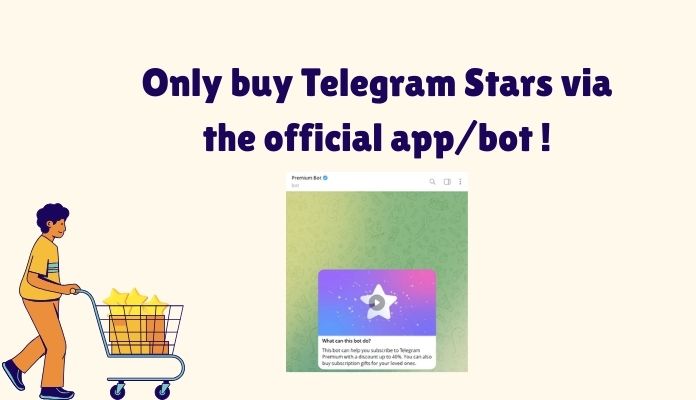
- Go to Premium Bot. (Click on the link.)
- Stars will be added to your Telegram balance.
4 Important notes:
- You should only use the standard version of Telegram, and your account must be a premium one.
- Stars are purchased inside the app and are tagged with the currency code “XTR.”
- There are hundreds (if not thousands) of channels and bots on Telegram that sell Telegram stars. They are all illegal. From the second half of 2025, Telegram started banning them. Be aware of purchasing Telegram Stars.
- You can use the @premiumbot to buy both gifts and stars.
How to Send Stars to Others
Sending Stars is easy and fun! There are three ways to spend Telegram Stars. Remember that they expire after 3 years if they are not used or withdrawn, so be generous and spend them.
1) Send to Creators
- Go to the channel or creator’s profile.
- Tap Send Stars.
- Pick how many Stars you want to send.
- Confirm the transaction.
2) Send Gifts to Friends
- Open a chat (friend or family member).
- Tap the profile or gift icon.
- Choose a Star gift pack.
- Confirm and send.
3) Use Stars as Payment
- When bots or mini-apps ask for payment in Stars, follow their instructions to buy digital goods or services.
How to Withdraw Telegram Stars
Creators and bot owners can withdraw Stars and convert them into real money through the following steps. Note that there should be at least 1,000 Stars available for withdrawal. After earning Stars in their channel or bot, they must wait a short period (often about 21 days) before withdrawal. During this time, Telegram moves stars from their Telegram balance to their Fragment (withdrawal) balance.
- Enter your channel or bot, and in the Settings, look for Balance. Under the Star Revenue section, you can see the number of collectable stars (21 days have passed).
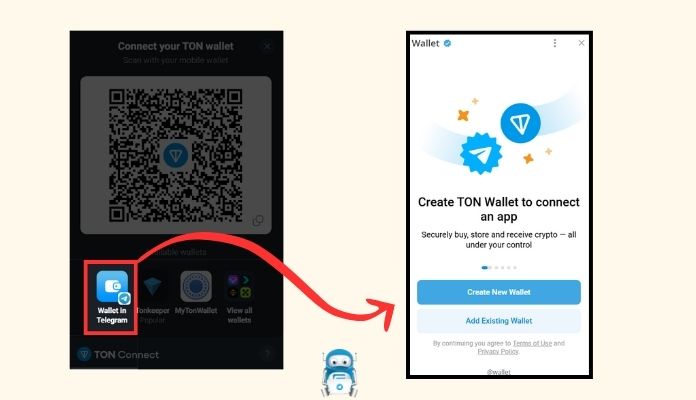
- Enter the Fragment website and click on “Connect TON.”
- In the opened window, choose your wallet. If you don’t have one, you can simply create one.
- After entering the wallet address and the number of Stars you want to collect, click “Collect reward.”
- Now the money is in your crypto wallet, and you can convert it into other currencies.
Note: Regular users who buy Telegram Stars to spend on digital goods, ads, etc., can’t cash them out. Only creators who earn Stars (e.g., via Star Messages and gifts) can withdraw them.
Why Telegram Stars Matter?
A few years ago, Telegram was just a messenger, a place to chat, share files, and follow channels. Now, it’s become a mini marketplace where money (in the form of Stars) flows between users and creators — safely, instantly, and without leaving the app.
- Creators can make money.
A creator can enable Stars on their channel or bot, and then the fans and followers can send Stars to support them. The creator collects those Stars and converts them into Toncoin (TON). They can then transfer TON to an external wallet, exchange it for other currencies, or reuse it in their business (like in ads).
- Digital businesses can grow inside Telegram.
Before Stars, Telegram businesses had to use PayPal, crypto, or manual payments to sell products and services. However, now, they don’t need an extra gateway or bot; all they have to do is enable the “Stars” in the channel or bot.
- Transactions are fast & secure since everything happens in Telegram.
When the users pay with Stars, they won’t be redirected to an external site. Also, paying with stars doesn’t need verification or bank approval. This can be a great help for game bots and businesses using the “Tipping Systems” (like Buy Me a Coffee).
12 Tips You Wish to Know before Using Telegram Stars
- You can only spend the stars inside Telegram. If you want to use them outside the app, you should convert them to TON.
- You cannot cash out the stars. The stars you buy can only be spent on goods, gifts, stickers, ads, etc.
- Stars cannot be used to buy physical items (like T-shirts or food delivery).
- You can’t buy Stars from external websites or crypto exchanges.
- TON’s conversion rate is not fixed. It changes based on Telegram’s internal rate and TON’s value. So, always check the current rate before converting.
- Only creators (like channel owners, bot developers, or mini-app builders) can withdraw Stars.
- When you send Stars, you can’t cancel or refund unless the seller (bot/creator) agrees to it.
- When creators or businesses receive Stars, Telegram takes a commission (5-10% for non-ad transactions + payment processor fees).
- Stars are stored in your Telegram account. So, you don’t need a wallet or a separate app.
- If you uninstall Telegram or switch phones, your Stars stay safe in your account balance.
- You cannot transfer stars to other platforms, wallets, or apps.
- If you resell the Telegram Stars, the app will ban you.
The Last Words
Whether you want to buy digital services, support your favorite creators, send fun gifts, or run ads, Stars makes it easy and simple. In other words, they let the content creators monetize their work and have their own dependent business. Of course, if they prefer PayPal or crypto gateways, they should use bots. One of the best platforms to create a professional bot is SmartBotsLand. Our store bot is totally similar to a website, with one difference: it’s much cheaper to develop and easier to run. Also, you don’t need coding (programming) knowledge to create your bot because everything is ready-made. Other bots by SmartBotsLand:
- Group management bots (to handle the group members and enforce rules)
- Subscription bots (to get subscription fees from subscribers and remove the nonpaying ones from the channel/group)
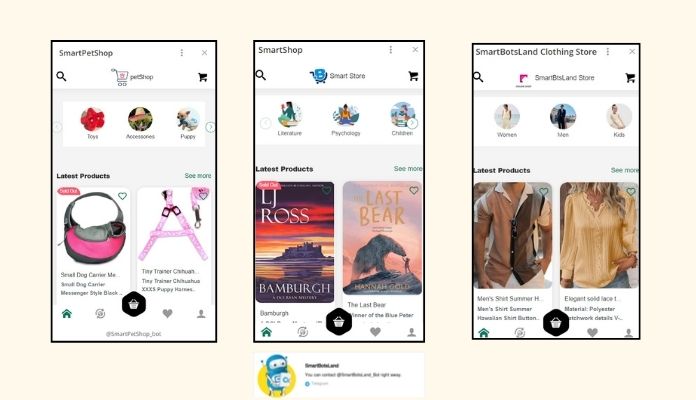
Sample of store bots made by our customers
FAQs
- Can I send my Telegram Stars to a friend?
Yes, you can send Stars to a friend, just like you send them to creators. - What happens if I buy Telegram Stars from someone else?
If you buy stars from unofficial websites, bots, or accounts, Telegram will ban your account immediately. - Can I withdraw Stars for cash?
Creators who earn Stars can convert them to Toncoin (TON) and then withdraw or trade them. Regular users can’t turn Stars back into cash. - Are Telegram Stars safe to use?
Yes, it’s safe to use them, but remember these 2 tips to make sure your data is secure: 1) keep your Telegram app updated, as the security bugs are fixed regularly, and 2) don’t share screenshots or codes related to your wallet or TG account. - Are Stars refundable?
Most Star payments are final. It means that you cannot get back your stars unless the creator refunds them manually. So, always double-check before spending.