














Imagine having an AI assistant that you can message from Telegram instead of opening a separate AI app every time (like what you do with ChatGPT every day). You send a message, and your assistant replies, works on files, searches websites, and more. That is exactly what OpenClaw does.
In this article, we explain how to connect OpenClaw to Telegram, what you need for each one, and what you can actually do after connecting them.
What Is OpenClaw?
OpenClaw is an AI assistant that runs on your own computer or server. Instead of using it only through a website, you can connect it to apps like Telegram, Discord, and other tools.
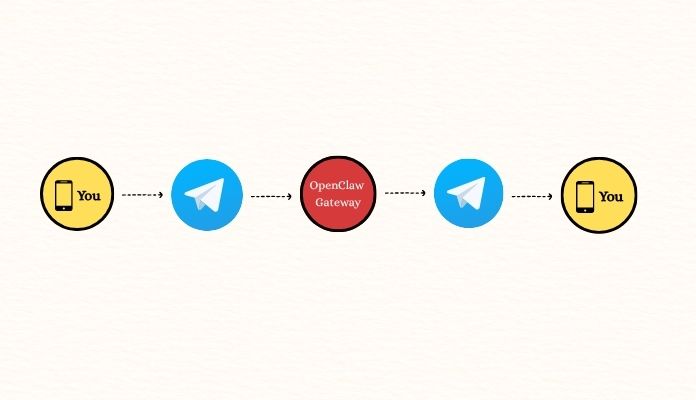
OpenClaw has a “Gateway.” This so-called Gateway works like a bridge between your AI assistant and these apps. In other words, you send a message on Telegram, the Gateway receives it, passes it to the AI, and then sends the AI’s response back to you.
What makes OpenClaw different from a regular chatbot is that it can do more than just chat. Depending on how you set it up, it can work with files and links, use different tools, browse the web, and even automate tasks for you.
Why Connect OpenClaw to Telegram or Discord?
The main reason is that you can use your AI assistant where you already spend time. You don’t have to keep switching between your messaging app and an AI website/app. You should just open Telegram or Discord and send a message to your OpenClaw assistant.
But here’s an important question: which one is better to connect to OpenClaw? Telegram or Discord? Let’s see their main differences:
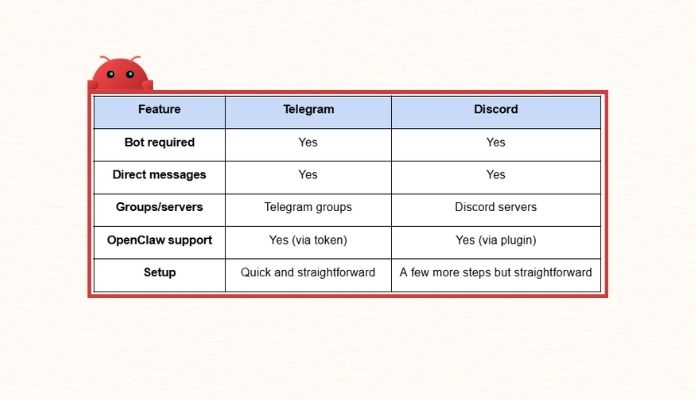
Note: The OpenClaw team recommends Telegram as one of the quickest ways to get started. You only need a bot token, and you don’t need to install a separate plugin.
How to Connect OpenClaw to Telegram
Follow these 3 steps to connect OpenClaw to Telegram:
1. Create a Telegram Bot
- First, open and start the official @BotFather.
- Use the /newbot command and follow the instructions. Telegram will ask you to choose a name and username for your bot.
- Once the bot is created, BotFather gives you a token. Keep this token private because OpenClaw uses it to connect to your Telegram bot.
Also read: Learn about the BotFather commands
2. Add Telegram to OpenClaw
In this step, you give OpenClaw the bot token.
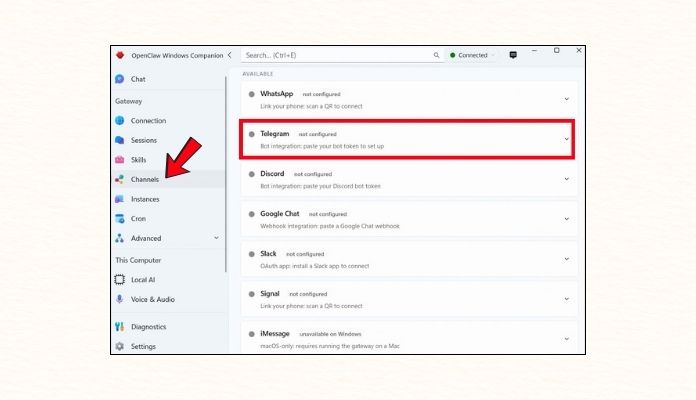
First, open the OpenClaw app and click “Channels.” In the opened list, choose Telegram.
Second, paste your token (that you received from BotFather) in the “bot token” field and hit “Save and Start.”
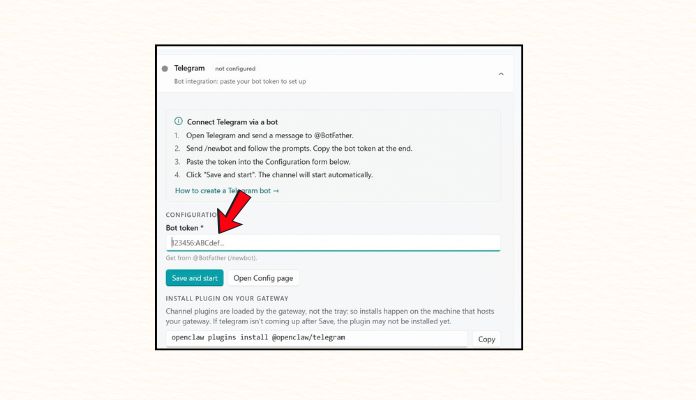
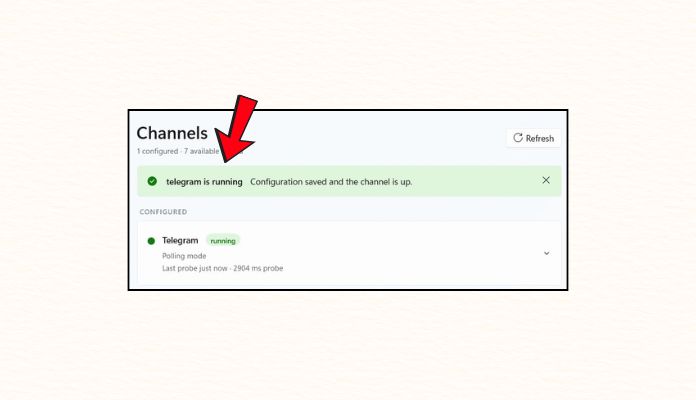
If you have done everything right, you will see the “Telegram is running” message on top.
Third, open Telegram again and get back to Botfather. Click on your bot ID and start it.
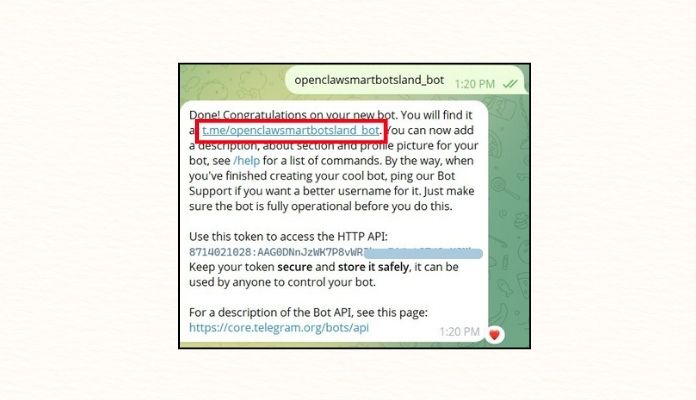
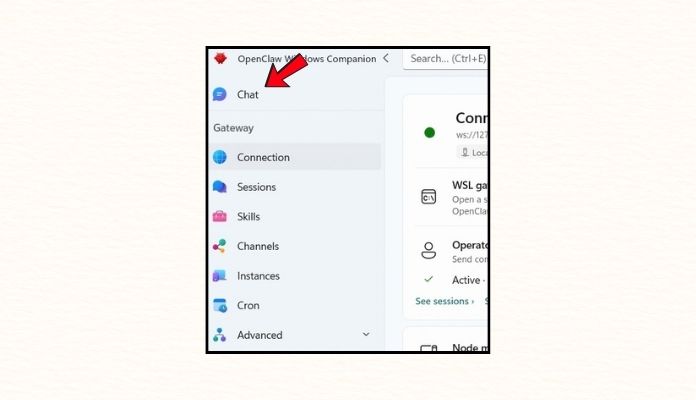
You probably see a message that says, “Access not configured.” Do not panic! All you have to do is copy this message and paste it in OpenClaw’s chat section. The app will resolve this issue automatically.
3. Add the Bot to a Telegram Group
If you want to use OpenClaw in a group, you should just add the bot to the group. Read this article to learn how to do it. Note that the bots have admin rights, so be cautious about your sensitive data.
What Happens After You Connect Telegram to OpenClaw?
Connecting OpenClaw to Telegram is just scratching the surface. Depending on your AI model, tools, and permissions, OpenClaw can do much more than just answer simple questions. For example, you could use it to:
- Ask questions and get AI-generated answers
- Edit documents and files
- Search the web
- Schedule messages
- Ask the bot to do repetitive tasks
- Work with images, audio, and other media, and more
OpenClaw works more like an AI agent than a simple chatbot. It is a skilled AI tool that can automate tasks and lighten your load. For example, instead of opening an AI app/website and writing a 200-word prompt, you can simply message your OpenClaw assistant:
“Check this document and give me the three most important points,” or “Remind me tomorrow to finish this article.”
Is It Safe to Connect OpenClaw to Telegram and Other Platforms?
OpenClaw can access powerful tools. Depending on how you set it up, it can edit files, run commands, and connect to other devices and platforms. This can be useful, but it also means you need to control who can use it and what it can do. So, a few rules won’t hurt:
- Keep your bot tokens private.
- Give the bot only the permissions it needs.
- Be careful when adding the bot to public groups or servers.
- Use sandboxing and tool restrictions where appropriate.
- Check your access policies before giving the agent powerful tools.
Also read: 6 Types of Illegal Content on Telegram
About SmartBotsLand
SmartBotsLand is a bot builder system that allows you to create and customize Telegram bots based on your needs and preferences. Of course, you should first create the basic bot via @botfather and then customize it. You can also use our ready-made bots:
- Shop bot: It looks like a shopping website that works inside Telegram. You can use it to sell physical and digital products. It also has built-in fiat and crypto gateways, so you shouldn’t worry about the payment process. [Get more info – demo included]
- Subscription bot: This bot is a combination of a police officer and a tax collector. You add it to a VIP channel/group and it collects membership fees, removes users who don’t pay, bans those who violate the rules, and so much more. [get more info]
Note: All bots have a 7-day free trial. You can test them for seven days and if you like them, you can purchase the premium.
FAQs
1) Can I connect OpenClaw to Telegram and Discord at the same time?
Yes. The OpenClaw Gateway is designed to be paired with multiple apps, including Telegram, Discord, WhatsApp, Slack, iMessage, Google Chat, Signal, and more. Connecting OpenClaw to one of them doesn’t mean you cannot connect it to others.
2) Do I need a bot to connect OpenClaw to Telegram?
Yes. You need to get the bot token from @botfather and enter it on OpenClaw’s website.
3) Can OpenClaw work in Telegram groups?
With bots yes. When you add the AI-driven bot to your group, it can do its tasks there.
4) Is Telegram easier to connect to than Discord?
OpenClaw’s documentation describes Telegram as one of the quickest channels to set up because it only requires a bot token. On the other hand, Discord needs an official plugin and some extra setup which makes this complicated.
5) Can I use OpenClaw without Telegram or Discord?
Yes. Telegram and Discord are just two of the available channels. OpenClaw supports several other messaging platforms, so you can choose the channel that fits your needs.