













A Telegram bot can do much more than send and receive messages. Bots can manage groups, sell products, accept payments, send reminders, and do many boring and repetitive tasks. If you are just getting to know Telegram bots, some words and terms might sound a little strange to you at first.
That’s why in this article, we have explained the Telegram bot vocabulary and the most common terms in simple language. Whether you are creating a bot, using one, or looking for a bot for your business, this glossary can act as a dictionary for you.
Common Telegram Terms
Chat: A chat is a conversation on Telegram. It can be a private conversation between two people, a group conversation, or an encrypted one (aka a secret chat).
Group: A Telegram group is a place where multiple users can talk to each other at the same time. A normal group can have up to 200 members, but a supergroup can hold 200,000 members.
Channel: A Telegram channel is used to share content with a large number of users. In channels, only the admin(s) can send messages, so the users are just readers. In fact, they can only react with permitted emojis.
Bot: A Telegram bot is a small program that works inside Telegram. It can respond to messages, show buttons, send files, collect information, send mass messages, and do other tasks automatically.
User: Anyone in the group or channel is called a user. Also, a person who interacts with a Telegram bot is called a “user.” For example, someone who starts a bot, sends it a command, or clicks one of its buttons is a bot user.
Admin: An admin is a person who manages a Telegram group, channel, or bot. Depending on their permissions, an admin can add or remove members, change settings, manage content, or control how a bot works. If you’d like to know more about the admin’s rights and permissions, click here.
Telegram Bot Vocabulary: Commands and Interactions
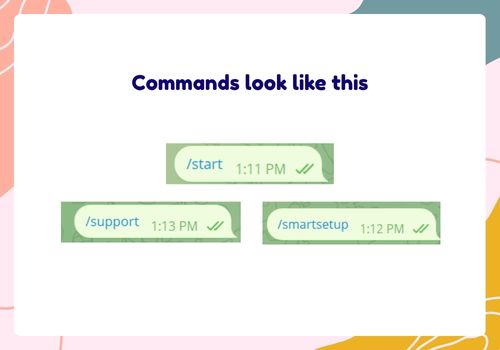
Command: A command is a message that tells a bot to do a specific action. Commands usually start with a slash, such as /start, /help, or /settings.
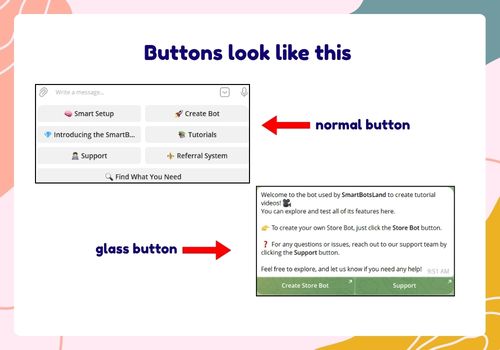
Button: A button lets users interact with a bot without typing a command. For example, a bot may show buttons such as Buy Now, Check Order, or Contact Admin. As of 2026, there are two types of bot buttons: normal and glass. They are functionally similar, but they differ in appearance. In the picture below, you can see their difference.
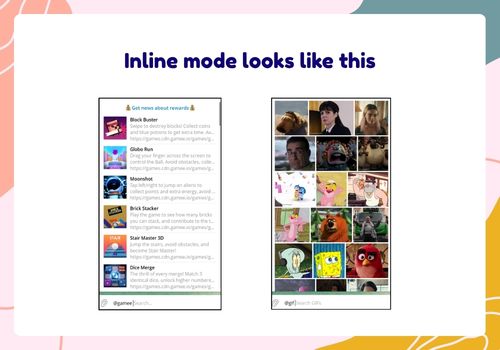
Inline Mode: Inline mode allows users to use a bot directly from the Telegram message box without opening the bot’s chat. Users can type the bot’s username and a search term to get results. The most famous bots with inline mode are @gif and @gamee.
Callback Query: A callback query happens when a user clicks an interactive button in the bot. The bot receives that action and responds to it. For example, you have a “Yes” or “No” button in your bot. Each button has hidden text called “callback data” (like “yes_clicked” or “no_clicked”). When the user presses that button, your bot reads the hidden text, runs the right code, and sends a reply to the user. This process is called a callback query.
Telegram Bot API Terms
Telegram Bot API: It lets developers connect their software to Telegram bots. With it, a program can send messages, receive updates, manage chats, and perform other bot-related tasks. Developers usually use APIs to build mini apps, accept payments, create games, and more.
Telegram Bot Token: The token is like your bot’s ID. You get this code when you create a bot through @BotFather. Important note: The token should be kept private because anyone who has it could control the bot.
Telegram Bot API Python: It usually refers to using Python to work with the Telegram Bot API. Developers can use Python libraries to create bots, process user messages, respond to commands, and connect Telegram with other services.
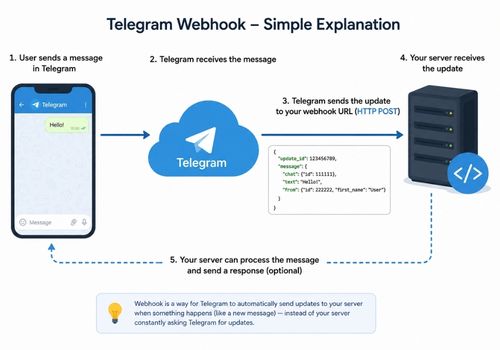
Webhook: A webhook lets Telegram send new bot updates directly to a specific web address. Instead of constantly checking Telegram for new messages, the bot gets the information as soon as an update is available.
Polling: It is another way for a bot to receive updates. The bot regularly asks Telegram whether there are new messages or other updates to process.
Telegram Bot Glossary about Payments
Payment Bot: A payment bot helps businesses or creators receive payments from users. It can be used to sell products, services, subscriptions, or digital content.
Subscription: A subscription gives a user access to something for a specific period, such as one month or one year. A subscription bot can handle payments, renewals, reminders, and access. So far, the best subscription bot on Telegram is SmartBotsLand. It lets you create different plans (free, 1 month, 3 months, yearly, etc.) and collects subscription fees with 100% accuracy.
Telegram Stars: Telegram Stars are a digital payment option inside the app. Users can use Stars to pay for digital goods and services.
Telegram Automation Terms
Trigger: It is an event that starts an automated action. For example, when a user joins a group, it can trigger a welcome message.
Workflow: A workflow is a series of actions that happen in a specific order. For example, a bot might receive a payment, confirm it, give the customer access, and send a confirmation message.
Notification: A notification is a message sent to inform a user about something. A bot can send a payment confirmation, subscription reminder, order update, or other notification.
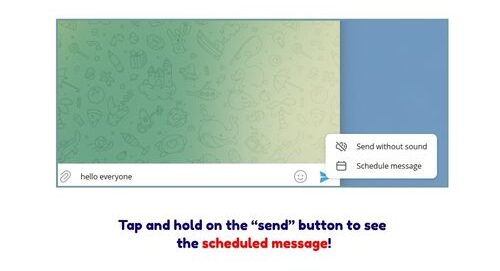
Scheduled Message: It is a message that is scheduled to be sent at a specific time. Bots can be used to schedule reminders, announcements, or other messages. Of course, Telegram also has this option, so you don’t need a bot just for that.
Technical Vocabulary for Telegram Bot (for developers)
JSON: It is a common format used to organize and transfer information. Telegram’s Bot API uses JSON when sending and receiving data.
API Request: It is an HTTP/HTTPS request sent from your server to Telegram’s servers to control a bot.
Database: A database stores information used by a bot. Depending on the bot, this could include user details, orders, subscriptions, settings, or other information. [Learn more]
Telegram Bot Glossary for Businesses
Subscription Bot: This type of bot helps subscription-based businesses sell plans, collect subscription fees, manage users, and more. For example, a crypto specialist can create a VIP channel and share signals there. Users who want to access this private channel should purchase a plan through the subscription bot.
Create your subscription bot for free (7-day free trial)
Referral Bot: A referral bot helps businesses run referral programs. It can give users a unique referral link and track those who join or make a purchase through it.
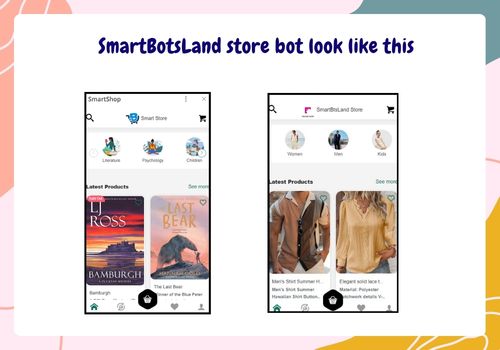
Store Bot: A store bot is like an e-commerce website, a place where users can choose and buy products (whether physical or digital ones). It can show product information, accept payments, and send order details.
FAQs about Telegram Bot Vocabulary
What is the difference between a Telegram bot token and a bot API?
A Telegram bot token is a series of numbers and letters that BotFather gives you. It’s like the ID number of your bot. On the other hand, the Telegram Bot API is the system developers use to connect their program (or application) to Telegram.
Can I create a Telegram bot with Python?
Yes. Python is one of the programming languages that can be used to build Telegram bots. Developers can use Python libraries together with the Telegram Bot API. If you don’t have coding knowledge, using platforms such as SmartBotsLand, InviteMember, and Dominobot are better options for you because they have pre-made bots and customizable dashboards.
What is the most important Telegram bot term to learn first?
If you are completely new, start with basic terms such as “bot,” “command,” “button,” “Telegram Bot API,” “bot token,” and “webhook.” Once you understand these, the more technical terms become easier to follow.